
An SVG favicon is a favicon written as vector code instead of pixels, declared with <link rel="icon" type="image/svg+xml" href="/favicon.svg">, so one small file stays sharp at any size. It is a good addition to a favicon set and a poor replacement for the PNG and ICO files, and the reason is a rule on Google's side that most guides leave out.
This guide explains how an SVG favicon works, what to write inside it, how to turn text into shapes so it draws properly, and how to ship it next to the files that cover everything an SVG cannot. The test results come from our own free tool, using small SVG files we made for this guide.
What an SVG favicon is and why people use it
An SVG favicon is an image file made of drawing instructions, such as rectangles and paths, which the browser draws at whatever size it needs. A PNG stores a fixed grid of pixels, so it can only be one size well. An SVG stores shapes, so the same file is crisp at 16 pixels and at 512.
People use one for three reasons:
- One file, every size. The vector does not need a separate version per size.
- A tiny file. Our test logo, a white letter on a teal rounded square, was 214 bytes as an SVG. The 16 pixel PNG made from it was 461 bytes, and the layered ICO was 15,086.
- Editable by hand. It is plain text, so you can change a color or a shape in any text editor.
Our test file is short enough to show in full:
<svg xmlns="http://www.w3.org/2000/svg" viewBox="0 0 512 512" width="512" height="512"><rect width="512" height="512" rx="96" fill="#0f766e"/><path d="M168 128h196v56H232v56h112v56H232v88h-64z" fill="#fff"/></svg>
A rect makes the rounded teal square and one path draws the letter F. That is the whole icon.
SVG favicon vs ICO vs PNG: which one to use
Use an SVG favicon as an extra, and keep the ICO and the PNG files as the base of your set, because Google's favicon guidelines do not list SVG among the formats it supports. That single fact decides the answer for any site that wants its icon in search results.
Here is how the three formats compare in a package we generated from the SVG above:
| Format | File | Bytes | Strength | Weakness |
|---|---|---|---|---|
| SVG | favicon.svg |
214 | Sharp at any size, tiny, editable text | Not on Google's supported format list |
| ICO | favicon.ico |
15,086 | Three sizes in one file, the classic root fallback | Large for what it holds |
| PNG | favicon-16.png, favicon-32.png |
461 and 714 | Fixed sizes, on Google's list | One file per size |
The favicon size guide goes through every file in the set, and the PNG to ICO guide explains why the ICO is so much larger than the PNGs. The short version for this page is that the SVG is the smallest file and the one with the fewest places it is guaranteed to work.
Does Google show an SVG favicon in search results
Google Search Central's favicon guidelines list the supported formats as BMP, GIF, ICO, PNG, JPEG, PPM and TIFF, and SVG is not among them. A site that publishes only an SVG favicon therefore gives Google nothing on its list to use.
The rest of Google's rules are the same for every format: the icon must be square and at least 8 by 8 pixels, with a recommendation of more than 48 by 48. Google also asks for a stable URL, a crawlable home page and a crawlable icon file, and it supports one favicon per hostname. It states that meeting the guidelines does not guarantee a favicon in results.
So the practical setup is to declare the PNG and ICO files for Google and everything else, and add the SVG as one more link line. Nothing is lost by including the SVG, and nothing depends on it.
SVG favicon browser support
Browser support for SVG favicons is documented in the Can I use table for SVG favicons, which tracks the versions and notes that change over time, so we point to it instead of copying a version list that would age. The table also carries one practical note: the SVG must be served with the MIME type image/svg+xml.
We have not run a browser by browser test for this guide, so we make no claim about what any specific browser does with the file. The safe approach does not need one: declare the PNG and ICO files as well, so any visitor whose browser ignores the SVG still gets an icon from the others.
How to add an SVG favicon to your site
You add an SVG favicon to your site by uploading favicon.svg to the root of the domain and adding one link line to the head of every page, next to the PNG and ICO lines. The head snippet from our tool, made from the SVG above, looks like this:
<link rel="icon" href="/favicon.ico" sizes="48x48">
<link rel="icon" type="image/png" sizes="16x16" href="/favicon-16.png">
<link rel="icon" type="image/png" sizes="32x32" href="/favicon-32.png">
<link rel="icon" type="image/svg+xml" href="/favicon.svg">
<link rel="apple-touch-icon" href="/apple-touch-icon.png">
<link rel="manifest" href="/site.webmanifest">
<meta name="theme-color" content="#1e5ac8">
The fourth line is the SVG favicon. The type="image/svg+xml" attribute tells the user agent what the file is before it downloads it, and the path begins with a slash so it works from every page. For where these lines go and how to serve them from a subfolder, see how to add a favicon to HTML.
How to make an SVG favicon
To make an SVG favicon, draw or export a square vector with a viewBox, use a few bold shapes, convert any text to outlines, and save it as favicon.svg. Each part has a trap, so here they are in order.
SVG favicon size: the viewBox and the width and height
An SVG favicon needs a viewBox, and ideally a width and height, on the root svg element so that whatever draws it knows the shape of the canvas. A square viewBox such as 0 0 512 512 is the standard choice, because every icon slot is square.
Our tool enforces this. An SVG with no width, no height and no viewBox is refused with this message: "This SVG does not declare a width, a height, or a viewBox, so there is no way to know what size to draw it at. Add a viewBox to the root svg element and upload it again." An SVG that declares an absurdly large size is also refused, with a note to set a smaller width and height or a viewBox. Both are fixed in one attribute on the root element.
SVG favicon design: bold shapes, high contrast
An SVG favicon should still be designed for 16 pixels, because a vector scales down as well as up, and the small version is the one people actually see. Fine strokes and tiny details turn to mush when the browser draws the icon in a tab. Use solid fills, two or three shapes and high contrast, as in the teal and white test logo. The design rules are the same ones in our guide on how to make a favicon.
SVG favicon with text: convert it to outlines
If your SVG favicon contains letters, convert them to outlines, meaning turn them into path shapes, before you upload it. Text in an SVG relies on fonts, and a program that draws the file may not have the font you named.
We saw this in our tests. We made the same one-letter SVG three times, changing only the font-family on a text element, and converted each in our tool. The 32 pixel PNG came out at 227 bytes for Arial, sans-serif, 293 bytes for sans-serif and 111 bytes for DejaVu Sans. The same SVG with the text removed also gave 111 bytes, so for that font name, no letter was drawn at all. The size of the output changed with the font name alone.
We also uploaded a wide wordmark that used a text element, and the actual-size previews showed a plain bar with no visible letters.
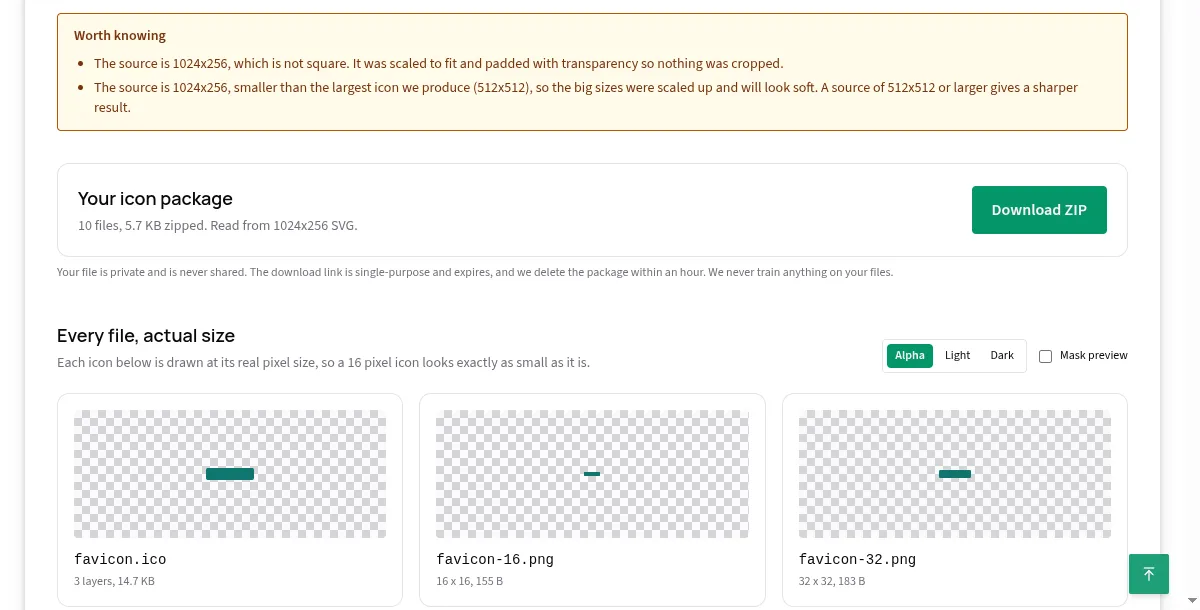
The same shape drawn as a path, like the F in our test logo, came through every time. In a vector editor the command is usually called Create Outlines or Object to Path. Do it on a copy and keep the editable original.
SVG favicon not working: what to check
If an SVG favicon is not working, check that the file loads at its URL, that the link tag names the right path and type, that the file is served as image/svg+xml, and that the SVG has a viewBox. Work through them in this order:
- Open the file directly. Visit
/favicon.svgin the address bar. If it is a 404, the upload or the path is wrong. - Check the tag. The line must be
rel="icon"withtype="image/svg+xml"and a correcthref. - Check the MIME type. The Can I use table notes that the file has to be served as
image/svg+xml. A host that serves it as plain text or as a download breaks it. - Check the root element. A missing
viewBoxleaves nothing for the renderer to scale. - Check any text. Convert text to outlines, as above.
- Check for a stale icon. An old icon can linger after a change, and our guide on adding a favicon to HTML has the fixes for that.
If the SVG shows nowhere but the PNG and ICO files do, you still have a working favicon, so none of this is urgent.
SVG favicon dark mode: a technique to test yourself
An SVG favicon can include a style block with a prefers-color-scheme media query, so the same file changes color in dark mode. The idea is a standard use of CSS inside SVG, and it looks like this:
<svg xmlns="http://www.w3.org/2000/svg" viewBox="0 0 512 512">
  <style>
    .mark { fill: #0f766e; }
    @media (prefers-color-scheme: dark) {
      .mark { fill: #5eead4; }
    }
  </style>
  <path class="mark" d="M168 128h196v56H232v56h112v56H232v88h-64z"/>
</svg>
We have not measured how browsers apply this inside a tab icon, so test it in the ones your visitors use before relying on it. Two things are safe whatever happens. First, the PNG and ICO files do not change with the theme, so choose colors that work on both a light and a dark tab for those. Second, our tool passes your SVG into favicon.svg byte for byte, so any style block you wrote survives untouched.
How to convert SVG to ICO and PNG in one step
To convert an SVG to ICO and PNG files, drop the SVG on our SVG to favicon converter, and it returns the whole package as one ZIP. The vector is drawn once at 1,024 pixels on its longest edge, and the ICO and every PNG are made from that single drawing, so every size starts from a sharp image.
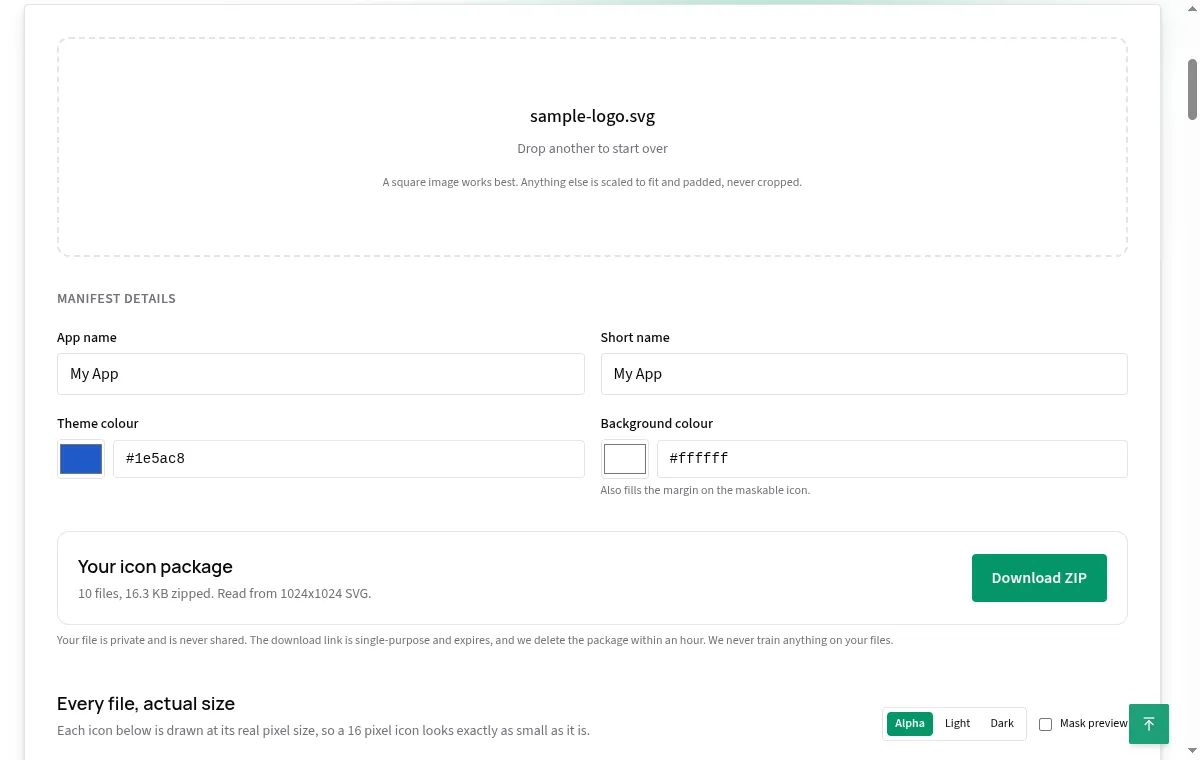
The package for our test logo held ten files: favicon.ico with three layers, favicon-16.png, favicon-32.png, apple-touch-icon.png, icon-192.png, icon-512.png, icon-maskable-512.png, favicon.svg, site.webmanifest and head-snippet.html. The favicon.svg was a byte for byte copy of the upload, which we confirmed because both files are 214 bytes. If you need only the ICO, the PNG to ICO page does that from a PNG, and the guide on PNG to ICO explains the format.
A raster source, such as a PNG or JPG, does not produce a favicon.svg. The tool does not trace a raster into a vector, because a vector wrapped around pixels would look like an SVG favicon without being one. If you need an SVG, start from a vector source.
SVG icon for a website: other places an SVG can go
An SVG can also serve as a logo or an icon inside your pages, which is a separate job from the favicon. In a page it can scale with the layout, be styled with CSS and stay tiny in bytes. The favicon is the browser's own use of an icon, declared in the head, and it follows the rules in this guide. Keep the two files separate if the favicon version needs to be simpler than your page logo, which it usually does.
The web app manifest is another place icons live. Its icon list in our package points to PNG files, at 192 and 512 pixels plus a maskable 512 pixel icon, not to the SVG. The what is a favicon guide explains the manifest and the maskable icon.
Common SVG favicon mistakes
The common SVG favicon mistakes are all small and all easy to fix:
- Relying on the SVG alone. Google's supported list does not include SVG, so keep the PNG and ICO files.
- No
viewBox. The file is ambiguous to anything that draws it, and our tool refuses it. - Live text. Fonts may be missing where the file is drawn. Convert to outlines.
- A relative path.
href="favicon.svg"fails on any page that is not at the root. Start with a slash. - The wrong
type. Useimage/svg+xmland nothing else for this file. - A source that is not square. A wide SVG is scaled and padded into a thin bar, as our wordmark test showed. Crop to a square symbol.
- Skipping the small-size check. Use the actual-size preview in the tool to look at the 16 pixel version before you ship.
The short answer
An SVG favicon is a vector icon declared with link rel="icon" type="image/svg+xml", and it is best used next to the PNG and ICO files, not instead of them, because Google does not list SVG as a supported favicon format. Give it a viewBox, keep the shapes bold, and turn any text into outlines. Our free SVG to favicon converter keeps your vector as favicon.svg and builds the ICO and every PNG from it in one ZIP. For the whole process from a blank start, read how to make a favicon.